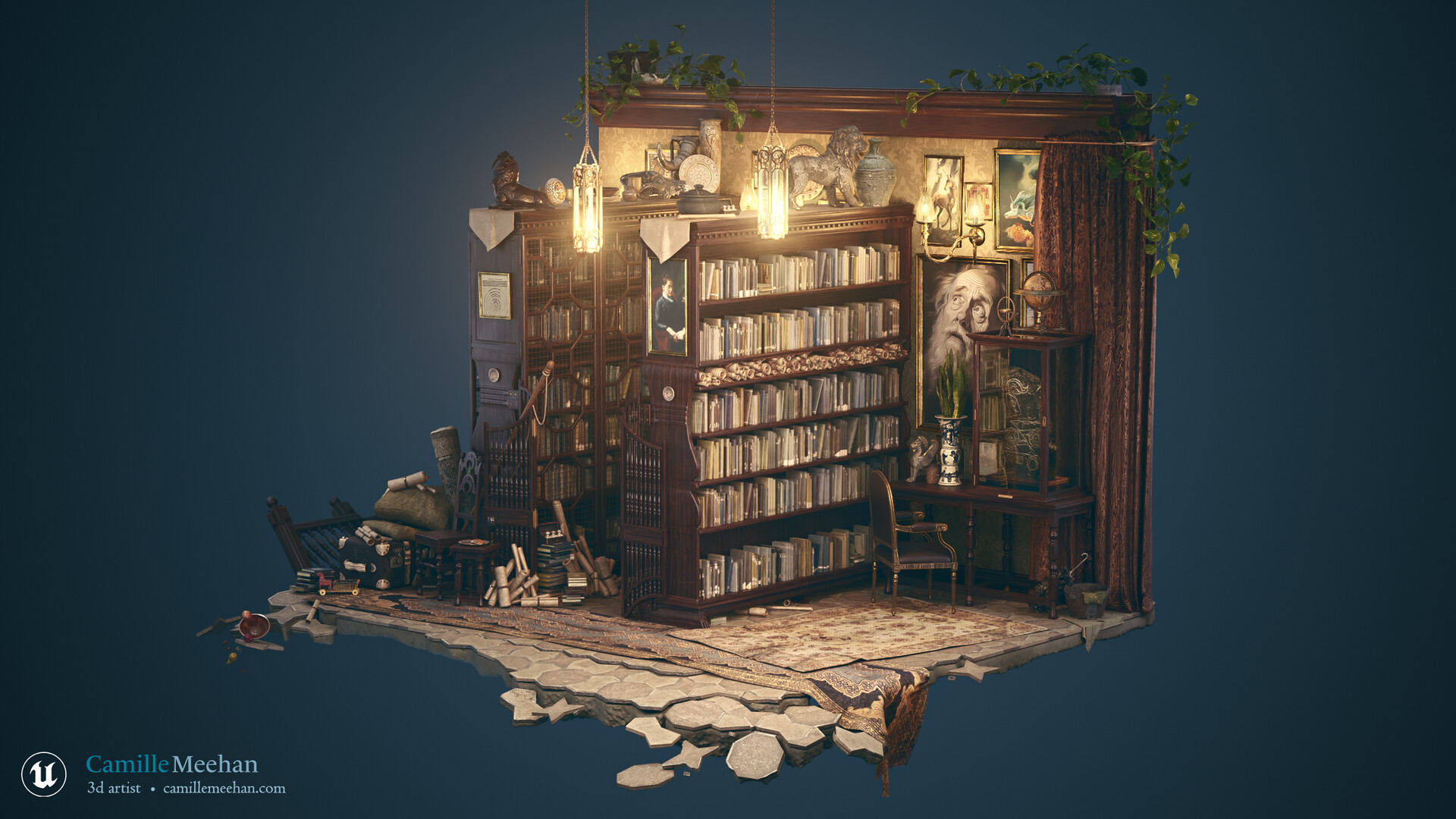
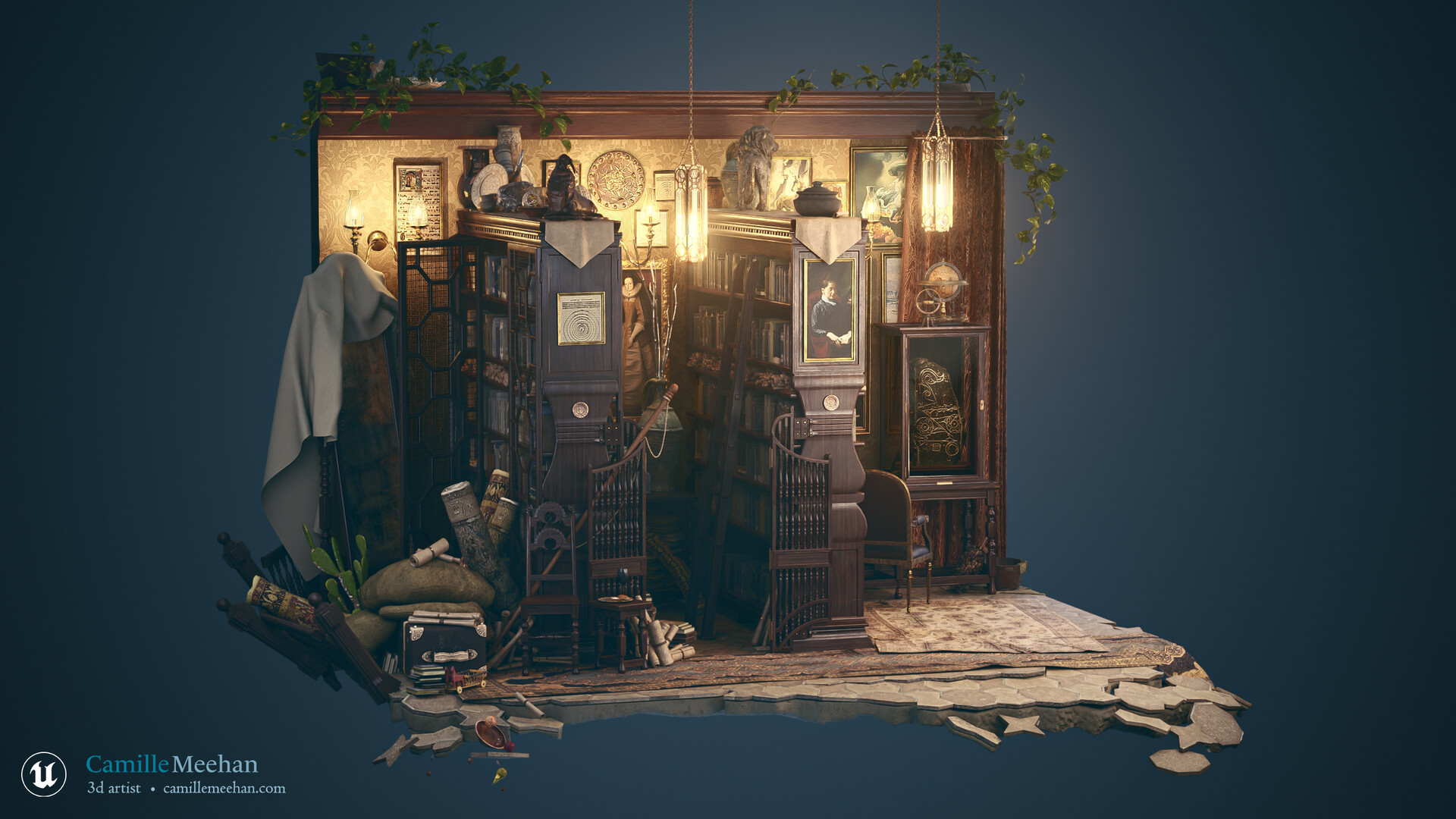
The scene.
Intrepid Library started as a piece for my Unreal 5 Modular Environments course at CG Master Academy. Thank you to my teacher Clinton Crumpler from Dekogon Studios and Mippithedork for invaluable support.
Here are a few of the finished screenshots from Unreal Engine 5.1 and 5.2.
Now how I did it.
Concept & Reference
A typical start for all my projects, gather references, organize assets, and once ideas are formed, block out shapes. This resulted in a lot of text and images.
I use PureRef and Pinterest to store references. I like Pinterest because it starts to suggest the types of images you are looking for. I like PureRef for active modeling.
I also chose a color palette of neutrals with some primary colors to pull attention to desired areas. I love how the images below do it and draw on them for inspiration.
I wrote up my ideas and planned around my strengths and weaknesses.
What is the story behind the scene?
The library was recently passed down from the wealthy benefactor to his daughter who will be taking over managing the affairs of their estate. The parents are alive. The owner is female and fairly young but full of passion for building upon her merchant family’s legacy.
Some of the details:
- Library was added to an older courtyard house, and the scene exists shortly after it was built. It is being regularly used.
- England, privately owned by wealthy benefactor.
- the library is used as a way to show off wealth and prosperity of the family to others
- 10 shelves or so worth of books, with a few sitting areas to read / study
- mostly mass-produced books (letterpress), with a few 1 of a kind books shown off prominently
- magical or electrical energy-based lighting sources
- artwork depicting foreign lands, creatures, or areas outside of local areas
- writing areas
- showcases for rare artifacts or heirlooms
- money is spent on the collection, and less so on up-keep and cleaning
- rarest of books are secured and protected
- library is attached to a family home with a courtyard/garden, maybe 2 stories tall, within the city
- an extremely goal-oriented family that sets goals and assists their progression towards those goals by meticulously tracking them
What challenges do you see for yourself?
Time management, I will focus on the large modular elements first, walls, floors, and ceilings. Setting up shaders is something I will need extra time to research and learn.
What parts will be easiest?
Modeling, and setting up the block out in Unreal Engine.
Note: In retrospect, modeling and block out was the easiest, but refining it to finer and finer block out details later on was an exercise in picking a focus and expanding from that area in circles, like Zorro. Nothing exists outside the circle.
What are your strengths as a 3D artist?
My 2D art skills translate well to 3D, meaning I have a strong grasp on artistic and creative fundamentals which allows me to see when scenes are achieving their goal, and when they are not, why that is. I have 15 years of professional design and marketing experience, meaning I prioritize both problem-solving and aesthetics when creating.
Blockout
With the bones of it figured out, I blocked it out in Unreal 5.1.
I made the asset gym first, and then pieced together the mesh instances in UE. This works great because you can reimport from a new file later on with the updated mesh. I used the third-party template to create my scene and so it was easy to hit play and record some video of Quinn walking around my block out. Very satisfying.
You can see above that there are basic rect lights in the alcoves which will be bay windows and point lights sit where scones will be. A quick lighting pass in Unreal is helpful in judging forms and motivating, the block out just looks nicer.
Export to Maya - Reimport Refined Meshes Back to Unreal
I continued on with more block out, exporting the gray boxes from Unreal Engine to Maya for modeling. When I exported my Unreal Meshes into Maya, because I had offset my pivots in the engine, it disrupted the pivots in Maya. As a result I had to reposition all of them. I have not offset pivots in Unreal since, instead I use the engine modeling tools to permanently move the pivot. This is important.
Comparing the prior video to this next one you can see the basic materials being added in and the suggestions of books, gates, display cases, and railings.
Textures
I begin adding and creating textures as well as developing my master material in Unreal Engine. I kept modeling but I wanted to get textures in as well so I split the time. Before creating textures I devised a plan for what textures I'd need in scene. You can see that below as well as the basic metal and wood trim sheet I used for most my large assets.
I created ORM, Normal, and Base Color for my wood and metal trim sheets by modifying smart materials in Substance Painter.
Note: As a designer it's tempting to pick a pleasing color scheme for your IDs, but this will make you sad. Pick vastly different colors, ideally ones that blind you when laid side by side, in this way Substance Painter will be sure to identify them properly.
I also did a lighting pass and despite the UVs not being finished, added Megascans textures to the walls, molding, railing, carpet, carved door and floor to get an idea of where the scene was going. The books were converted from a static mesh to a blueprint which uses an array of meshes and ai generated designs to create the variety you're seeing now. I benefited greatly from Mippithedork's help here.
At this point there are still many handmade assets remaining to be modeled. Specifically the bay window shelves, doors for the shorter bookshelves, a brace/hinge mechanism to hold the gates up, and the glass room windows and doors.
Post Process Volume & Lighting Pass
With all the new meshes in, the new post process volume, and a lighting pass the library begins to look petty polished.
It's about this time that Unreal started crashing on me.
Which fortunately I resolved with some troubleshooting.
AND then, there was a brief intermission for GDC!
So, there is thing you should know about called the GDC Conference Associate program. It's a bundle of amazing motivated game developers who maybe couldn't bankroll that 2k ticket to GDC, but still wanted to attend. So they applied and were the fortunate few paid to help create a great con. I am one of those devs, who applied, got rejected, and then by the grace of @Sephiroth After Not Surviving got pulled off the waitlist.
Applications are open now and this year is likely to be even more competitive. I'm going over my application essay with a fine-toothed comb now. (okay, not right now, right now I'm creating this WIP post)
Back to the project.
The result of all my modeling, texturing, and lighting was pretty sweet. Take a look.
First, the furniture modeled from repeated use of the same four pieces (essentially.)
And then the library hall, looking in from the glass room.
I began blocking out the small scenes within the larger overall scene. Display cases of books, coins, documents, storage of the kitchen's good china, dolls picked up from abroad, dried gourds, a giant bird's egg, or perhaps a dragon's?
Scope Reduction
This is when I saw a big problem.
I needed an environment in my portfolio to start actively applying for prop and environment art work at game studios. I could turn an impressive scene out quicker, if I reduced my scope, and so I did. I researched smaller presentations of 'corners' of rooms and single props, deciding I would present a slice of the library floating in space with the floor crumbling away ala Dr. Strange.
Floor
With the new scope of the library limited to a fraction of the original, I removed all but the essentials; bookcases, gates, lights, doors, walls, roof, and floor. Importantly, I picked one view to focus on for my portfolio and bookmarked it in Unreal. You can set that in the viewport dropdown. With my shot locked in place I began adding in small furniture pieces to fill up the space and help me determine where a floor should begin and end. Then rough ideas are drawn on top.
To get the crumbling floor effect I desired, I needed to cut up the floor to match the Megascan tile pattern I was using. When faced with a new task I sometimes write a plan for it, breaking it down into stupid simple steps. Here is the one I made for the floor.
The result in Unreal Engine ends up looking like this.
Added in some of my props as well as some assets from other locations which I'll list in depth at the end of the post.
Let's talk Cinema 4D for a moment.
Yes, Cinema 4d. I ran into a few trials using Maya with instancing and layers when creating my library. The layers weren't removing meshes leading to difficulty in the visibility and grouping. The instances would work, but I could not change the material on a parent and have that reflect on the child. I tested, researched, and reached out to friends who're more skilled in the software for help* with limited success.
You can skip this bulleted section, it's a list of my rage.
- Infuriating settings issue that led to major component selection problems which are documented on the Autodesk forum.
- My viewport clipping settings would switch on me at times when I focused on meshes, resulting in me manually fixing all 4 viewport settings back.
- Crashing, which I expected. I have backups, and celebrate my first Crash Day with cake every year. (August 19 in case you'd like to have a slice )
- Slow.
- The UI.
- The outliner.
- Freeze transforms and reset.
- Lack of non-destructive modifiers.
I'm glad you ignored that. So, Cinema 4d, it has a delightfully clear outliner, it's wicked fast for large scenes, procedural non-destructive creation, generators, parametric modeling, physics that just happen like Hermione Granger waved her magic wand, and instances with updating materials. I have noticed a striking lack of crashes.
* Thank you AD, Neihc, Mippithedork, and Big_Monet for consistently helping me troubleshoot Maya and for providing an ear to my trumping.
Prop Gathering & Creation
Scrolls
The scrolls miraculously appeared in the scene images above. That's because I lost track of them while writing all these work in progress updates. They're one of the more interesting bits though, and take advantage of non-destructive editing.
I researched scrolls a bit, and learned two heartbreaking things. First, we aren't 100% sure how historical Roman, Greek, and Egyptian scrolls were constructed. Secondly, that much of what I know about Hypatia is potentially a children's book fabrication?
More importantly, here are the reference photos I found.
Rather than create one mesh, I built on one single scroll generator. The generator was made with a combination of modifiers and deformers which allows for a wide amount of future variation. With the single scroll generator, I made 15 total scrolls.
I added my new scrolls to the asset library seen on the left for future use. The material texturing the scrolls can be seen in the bottom left as well.
These 15 scrolls were used to create all of my arrangements.

Check out the scroll generator settings in the video below, it's short but you get the idea.
To place the scrolls into the diamond shelves I used a tool called dynamic place. This simulates physics quickly in real-time. I also included a video of that, it makes life much easier.
As an experiment, I set up soft body colliders for about 100 scrolls and dropped them to the ground before importing them into my scene. Beautiful.
I also used the scrolls for rugs, which are just scaled up, and a few of them have wrinkles from a fabric simulation I ran in C4D.
Mirror
I needed to add something to the left corner to soften that hard wall line. The tall shape I settled on was a cloth-covered mirror. I drew the concept based on gathered references and then modeled the mirror before running a cloth simulation over the top. The cloth simulation was a little tricky with manual smoothing and fixing of verts to get the voluminous silhouette I was going for.
Sketchfab, Marketplace, and Megascans
The other props were sourced from a variety of locations. The Sicka Mansion pack in the Unreal Marketplace featured prominently as did the plants, tarps, and pots of Megascans. The more unique assets like the horns, painted eggs, walrus statue, and other similar items came from places like the Smithsonian, museums that made their artifact scans available to the public domain. Many of those meshes required the creation of maps, as they would sometimes only have a basecolor, or in some cases vertex coloring. In addition to creating maps they were often spotlessly clean so I added dirt and grime in Substance Painter while creating the other missing maps.
There are a few places where I used Unreal's modeling tools to deform fabric and it worked extremely well. The curtain on the right side, and the two rags near the cleaning bucket also far right were bent completely out of shape, and they look natural. *chefs kiss to the deform tool*
You can see the final props added to the scene below, all fitting into the general shapes of the drawover.
Rugs, carpets, and bags.
I ran fabric simulations on a few things, the most helpful of which were adjusting the rugs from an asset pack to be dangling off the edge and interacting with each other. The other overlooked fabric sim is the nice gravity added to the sacks sitting atop the trunk far left. Originally they didn't interact, with the edition of a soft body simulation tag and a collider tag in C4D they now feel chonky, with corners sagging over the edges.
Texturing Paintings
Lastly, the paintings on the walls add a great deal to the scene, though they can be easily overlooked. I wanted to create a patchwork texture on the walls, filling the space with interest. This is a technique I've seen skilled interior decorators use and I am quite fond of it, actively working on filling a wall of my home with brass and metal in a similar fashion.
The paintings themselves are a combination of old period pieces from the 1600-1700s, two Midjourney pieces that have been touched up and edited in Photoshop, and three of my own digital paintings, the unicorns and the fish cat below.
Here is the Midjourney family portrait I created for the wealthy patrons of the manor. I combined two pieces and digitally painted the hands back on where they have been rendered formless stumpies.
And here are my pieces in the scene. Reef Unicorn and Lil' Fish can be seen in my portfolio.
The final countdown.
One of the issues with my post-process volume at the beginning was that it made certain surfaces too shiny. I adjusted the cube map intensity and that brought it down to a reasonable level. I added some vignetting to the screen to draw the eye to the center of the screen where my piece was located. I also adjusted the lighting a bit to account for the addition of all the new props.
After the last lighting pass I set up a few cameras to capture the most interesting parts of my scene, adjusting the depth of field and exposure to get a soft focus on the edges. I rendered two shots from each camera, one done with lumen and another with path tracing. The resulting renders were composited and touched up in Photoshop to have them look their absolute best.
You can see the rest of the final images, including closeups on my Intrepid Library portfolio post. If you found my WIP helpful, please like or share my Intrepid Library scene, it's very helpful.
I didn't state it earlier but I want to be sure to say it now, thank you to Unreal Source (formerly Slackers) voice chat for the support. I'm so glad I timidly asked for help just over two years ago. You are too much.